

Description
Automated Bookmark Cleanup Tool
Overview
The software is designed to simplify the process of managing outdated or inactive bookmarks across web browsers. It addresses the common challenge of digital clutter by helping users identify and remove bookmarks that no longer lead to functional websites. This tool is particularly useful for individuals who rely heavily on bookmarked resources for work, research, or personal organization. By automating the detection of broken links, it reduces manual effort and improves browsing efficiency.
Target users include professionals, students, and everyday internet users who maintain large collections of bookmarks over time. The tool operates without altering any data unless explicitly approved by the user, ensuring a safe and controlled experience. While the developer has not provided additional background information, the software’s functionality suggests a focus on user-centric productivity solutions. Real-world usage scenarios include cleaning up bookmarks after a project completion, preparing for a new workflow, or maintaining a streamlined digital workspace.
Key Features & Capabilities
- Link Validation – Automatically checks the accessibility of each bookmarked URL to determine if the site is currently reachable.
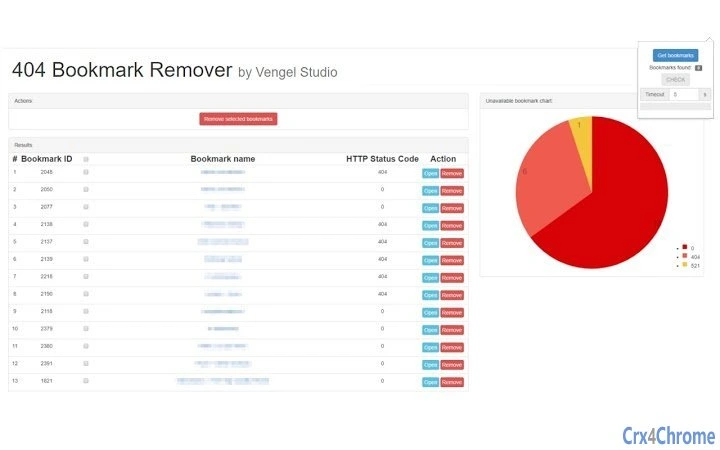
- Interactive List Display – Presents a clear, user-friendly list of all bookmarks, highlighting those that are no longer functional.
- Manual Removal Control – Ensures no changes are made without explicit user approval, preserving data integrity.
- Visual Analytics – Displays a chart to illustrate the proportion of active versus inactive bookmarks, offering a visual summary of the cleanup status.
These features support efficient digital hygiene by enabling users to make informed decisions about their saved links. For example, a researcher can use the tool to audit their bookmark collection before starting a new study, ensuring only relevant and accessible resources remain. Similarly, a student preparing for exams might use it to organize their study materials by removing outdated references. The tool’s non-invasive approach ensures users retain full control over their data throughout the process.
User Interface, Workflow & Performance
The user interface appears to be designed with simplicity and clarity in mind, focusing on intuitive navigation and immediate feedback. Users are likely guided through a step-by-step workflow: initiating the scan, reviewing the results, and selecting which entries to remove. The interface may include visual cues such as color coding or icons to differentiate between functional and broken links.
Workflow efficiency is enhanced by the tool’s automated scanning process, which minimizes the time required to evaluate hundreds of bookmarks manually. The software does not specify performance details such as CPU or RAM usage, but based on its described function and size (2.1 MB), it is expected to operate with minimal system impact. The developer did not provide additional information on stability or background behavior. Performance observations are based on general software behavior patterns, indicating that the tool should remain responsive during operation.
Compatibility & System Requirements
The software is compatible with Windows, Mac, and Linux operating systems, making it accessible to a broad user base across different computing environments. It is available in version 1.0.0 and has a file size of 2.1 MB, which suggests a lightweight installation. The developer did not specify exact system requirements, so users should ensure their system meets general standards for running desktop applications.
Compatibility information was partially provided, and no additional hardware or software prerequisites were listed. Users are advised to verify that their system supports the required browser extensions or integration points, especially if the tool operates within a browser context. The lack of detailed technical specifications means that users should monitor the application’s behavior during initial use to confirm smooth operation.
Pros and Cons
Pros
- Automates the tedious task of identifying outdated bookmarks
- Provides visual feedback through a chart to track cleanup progress
- Ensures user control by requiring approval before any deletion
- Lightweight installation at 2.1 MB with broad OS support
- Free to use with no cost barriers to entry
Cons
- Exact performance metrics and resource usage were not specified
- Developer background and company details were not provided
- No information on update frequency or future development plans
- Functionality may depend on browser extension integration, which could vary by platform
FAQ Section
Is this tool compatible with all major browsers?
The software supports Windows, Mac, and Linux, but specific browser compatibility was not detailed. Users should verify integration with their preferred browser.
Is the software safe to use?
Yes, the tool does not make changes to bookmarks without explicit user approval. It is designed to scan and report, not alter data automatically.
How often should I run the cleanup process?
There is no fixed schedule. Users may choose to run it periodically, such as monthly or after completing a major project, to maintain a clean bookmark library.
Does this software require an internet connection?
Yes, an active internet connection is required to validate the accessibility of each bookmarked URL during the scan.
Can I use this tool offline after the initial setup?
While the tool can be installed locally, the core functionality—link validation—requires an online connection to check website availability.
Final Thoughts
Automated Bookmark Cleanup Tool offers a practical solution for users overwhelmed by digital clutter. Its ability to scan, analyze, and present outdated bookmarks in a user-friendly format makes it a valuable addition to any productivity toolkit. The inclusion of a visual chart adds a layer of insight, helping users understand the state of their saved links. Despite limited information on performance and developer background, the tool’s transparency and user control stand out as strong advantages.
It is especially beneficial for professionals and students managing large volumes of online resources. The free availability lowers the barrier to adoption, allowing users to test its functionality without risk. For anyone seeking a reliable, no-cost way to maintain a clean and functional bookmark collection, this software delivers on its core promise.
Download Automated Bookmark Cleanup Tool now.
Guides & Tutorials for 404 Bookmark Remover Extension for Chrome
How to install 404 Bookmark Remover Extension for Chrome
- Click the Preview / Download button above.
- Once redirected, accept the terms and click Install.
- Wait for the 404 Bookmark Remover Extension for Chrome download to finish on your device.
How to use 404 Bookmark Remover Extension for Chrome
This software is primarily used for its core features described above. Open the app after installation to explore its capabilities.
User Reviews for 404 Bookmark Remover Extension for Chrome 0
No reviews found





